 Sheetling Sheetling
A Chrome extension for invoices, bank statements, reports and statistical yearbooks. It reads the PDF's own text layer and vector rules inside your browser and builds a real .xlsx. Your file never leaves your computer.
Three complete conversions free before you pay. No subscription, no account.
"permissions": [] and
"host_permissions": [], and its page CSP sets connect-src 'self' — so
Chrome itself blocks any request to an outside domain. You can confirm it in DevTools → Network:
zero requests during a conversion.
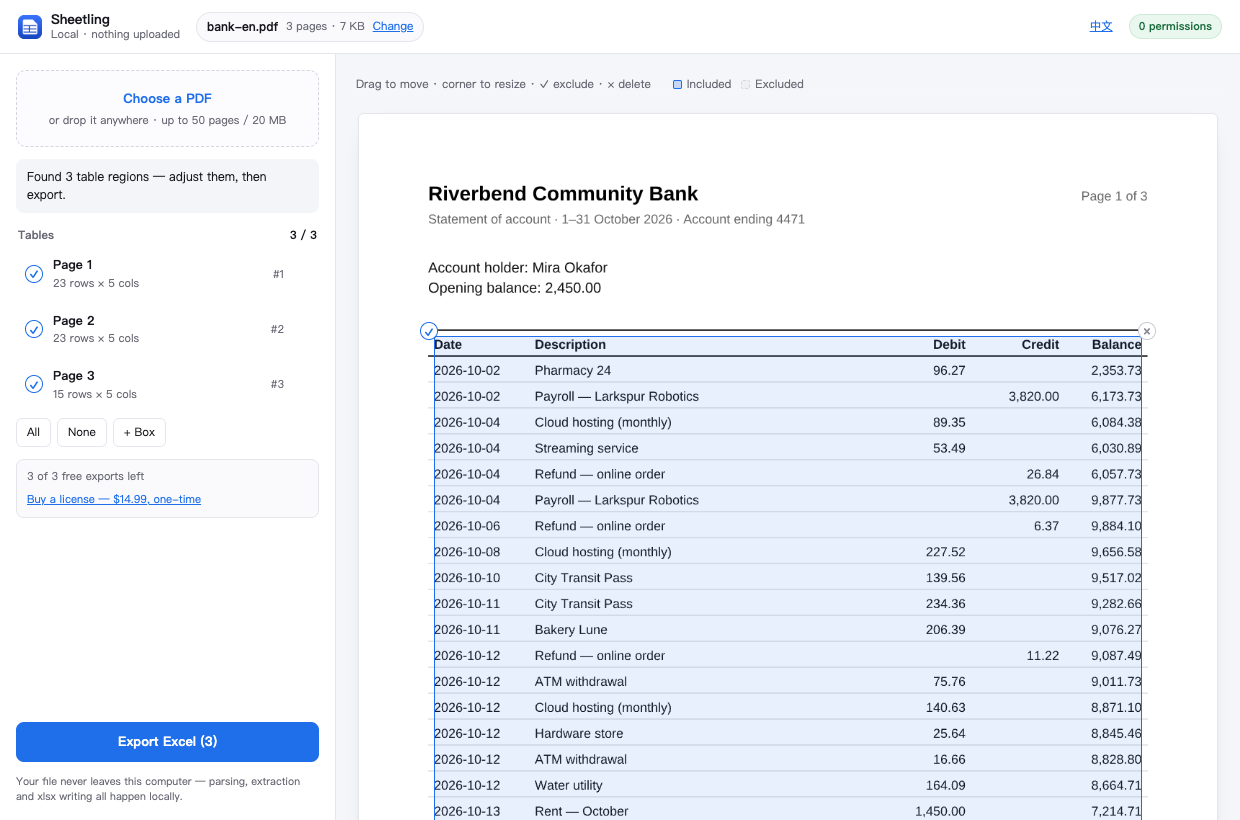
The actual extension window: detected tables come up as boxes you can drag, resize or drop before exporting. Real PDF, no mockup.
Amounts, dates and percentages are written as real numbers and dates — ready to SUM, sort and pivot. Long IDs (invoice numbers) stay as text so leading zeros survive.
Tables drawn with borders are rebuilt from their lines, so merged headers come out as merged cells in Excel, not blank ones.
Multiple tables in one PDF become multiple sheets, named by page (p1, p2-1, p2-2).
Detected tables appear as boxes: drag to move, corner to resize, click to exclude. When the automatic guess is wrong you fix it in seconds instead of re-exporting.
1.234,56 and 1,234.56 are read as the same amount; 28.10.2024 becomes a real date. Ambiguous formats are left as text rather than guessed.
Follows your browser language; switchable in the top bar. Chinese invoices export with Chinese sheet names.
| What | Price | Notes |
|---|---|---|
| Free trial | Free | Three complete conversions — whole files, exported in full. Not three pages, no watermark. |
| Sheetling license | $14.99 once | Unlimited conversions forever. One-time payment, no subscription, no account, no device limit. |
After checkout you receive a license key by email. Open the extension, paste it into the key field in the left sidebar, press Activate. The key is verified on your machine — the extension never sends it anywhere to check, and it keeps working offline.
Payments are processed by Creem, which acts as merchant of record and handles sales tax and receipts. Card and other supported methods are handled on Creem's checkout page — this site never sees your payment details.
No account, no card, no email. Install the extension and convert three files. The key field only appears when you want more.
The manifest requests no permissions and no host permissions, and the extension's own
Content-Security-Policy only allows connect-src 'self' — so an outside request is blocked by Chrome,
not by our good intentions. Open DevTools → Network, convert a file, and watch it stay empty. The
privacy page has the exact steps.
Invoices (including Chinese e-invoices and English bills), bank statements, expense reports, government statistical yearbooks, and tables inside papers with ruled lines. Results are best when the table has visible column alignment or borders.
Drag it, resize it with the bottom-right corner, or draw a new box anywhere on the page. Only the boxes you keep are exported.
Yes — 14 days, no interrogation. See refunds.
Reply to your receipt or email the support address below with your order number and we re-send it. The license is not tied to a device count.